


For most Australian multi-location businesses, platform choice depends on your scale and internal capability:
- Small networks: Managed WordPress Multisite with a control layer like Sitelets gives you centralised branding, staged publishing and built-in local SEO without heavy development overhead.
- Growth networks: A headless CMS paired with a modern front end delivers performance gains and real-time integrations (booking, POS, inventory) that WordPress alone struggles to match.
- Enterprise and franchise networks: Purpose-built SaaS platforms such as Vendasta or Cerca handle listings, reviews, permissions and reporting at scale from a single dashboard.
There are three common technical approaches for multi-location brands—WordPress Multisite (cost-effective for small networks), headless CMS (performance and integrations for growth networks), and purpose-built SaaS platforms (maximum control and scalability for enterprise and franchise). Your organisational profile and growth horizon determine which makes the strongest platform choice.
The immediate next step: book a discovery call with CantyDigital or scope a 5-location pilot that proves your GBP sync and review workflows before committing to a full rollout.
Key takeaways
For most Australian multi-location businesses, the right platform is the one your team can actually operate, paired with a listings and review stack built into the project from day one.
| Point | Details |
|---|---|
| Match platform to scale | Small networks suit WordPress Multisite; growth networks suit headless CMS; enterprise networks suit purpose-built SaaS. |
| Single domain is non-negotiable | Use one domain with templated location pages to consolidate authority and avoid duplicate content penalties. |
| Operational stack matters as much as the CMS | GBP sync, listings management and review workflows must be scoped and built alongside the website, not retrofitted later. |
| Pilot before full rollout | Launch 1–5 locations first; verify GBP sync, schema and Core Web Vitals before rolling out to the full network. |
| CantyDigital recommended implementer | CantyDigital scopes and builds multi-location sites with integrated local SEO and review workflows for Australian businesses. |
Table of Contents
- Which platform types suit multi-location businesses and when to pick each?
- What features must every Australian multi-location website have?
- How to evaluate platforms using an operational checklist
- What do Australian multi-location sites typically cost and how long do they take?
- How do integrations and operations keep every location visible in local search?
- How should you migrate and roll out a multi-location site with low risk?
- What security and compliance checks must Australian businesses complete?
- How CantyDigital builds and manages a multi-location website
- The platform decision most businesses get wrong
- CantyDigital: expert help for your multi-location website
- Useful resources from CantyDigital
- Sources
Which platform types suit multi-location businesses and when to pick each?
Three technical approaches dominate the multi-location business platforms comparison, and each suits a different organisational profile.
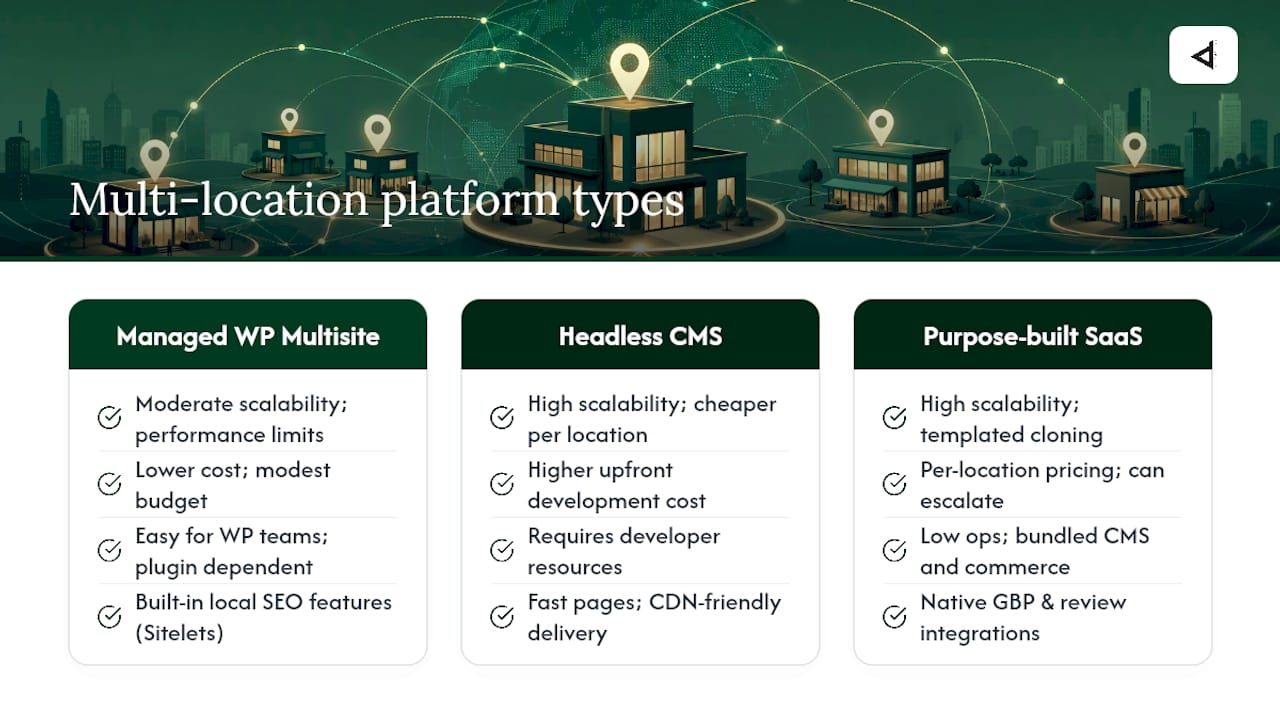
Managed WordPress Multisite runs a single WordPress installation that serves multiple sub-sites under one codebase. It suits businesses with an existing WordPress skill set, a modest budget and a need for consistent brand governance without enterprise pricing. Tools like Sitelets add a control layer that centralises branding, enables staged network publishing and includes inbuilt local SEO features. The trade-off is plugin dependency and performance ceilings as location count grows.
Headless CMS with a modern front end (Next.js, Astro, or similar) decouples content management from presentation. Content editors work in a familiar interface; the front end is served as static or server-rendered pages, which means faster load times and easier CDN distribution. The upfront development cost is higher, but incremental location additions become cheaper once the template is built. This approach suits teams with developer resources and a 3–5 year growth horizon.
Purpose-built multi-location SaaS platforms like DevHub, SGEN, Core dna and Cerca bundle CMS, commerce, listings and governance into one product. They reduce reliance on plugin stacks, speed up location launches through templated cloning, and often include native review and GBP integrations. Pricing is typically per location or per point of sale, which can escalate quickly for large networks.
What features must every Australian multi-location website have?
Platform type matters less than whether the platform actually delivers these capabilities in production.
- Centralised templates with local overrides: HQ controls brand, colour, fonts and legal copy; location managers can edit hours, staff bios and local promotions within defined limits.
- Per-location structured data/schema: Each location page needs its own LocalBusiness schema with correct NAP (name, address, phone). SGEN treats every location as a native record with per-page schema editing, which removes the manual overhead.
- Google Business Profile sync: Listings data must flow from a single source of truth to GBP, Apple Maps and data aggregators. Broken sync is the most common cause of ranking drops after a rebrand or address change.
- Review and reputation workflows: Automated review requests, triage queues and templated responses at the location level, with HQ visibility across the network.
- Role-based permissions: HQ, regional manager and location owner roles with clearly scoped editing rights.
- Staged publishing and global updates: Push a price change or a legal disclaimer to all locations simultaneously, with a preview and rollback option.
- Location finder with persistent selection: A user who selects their nearest location should not have to re-select it on every page visit.
- Australian compliance: Australian privacy regulations govern how you collect and store customer data. If your site handles ecommerce, ABN and GST data must be stored and displayed correctly. For health, finance or government-adjacent industries, data residency within Australia is often a procurement requirement.
Pro Tip: Use a single domain with templated location pages (e.g. yourbrand.com.au/locations/sydney) rather than separate domains per location. A single-domain strategy consolidates domain authority and prevents duplicate content penalties that separate domains almost always trigger.
How to evaluate platforms using an operational checklist
Match platform capability to your operational model, not to a feature checklist. A platform with 200 features is worthless if your team cannot operate it without a developer on call.
| Criterion | Weight | Questions to ask |
|---|---|---|
| Ease of setup/management | High | Can a non-developer add a new location? |
| Governance and templating | High | Who controls the master template and what can locations override? |
| Local SEO integration | High | How does GBP sync work? Who owns the source of truth for NAP data? |
| Review management | Medium | Can you triage and respond to reviews from one dashboard? |
| Integrations/API | Medium | Does it connect to your POS, booking system or CRM? |
| Performance/SEO friendliness | High | What is the Core Web Vitals baseline? Is schema auto-generated? |
| Pricing model | Medium | Is it per location, per user or flat? What triggers price increases? |
| Scalability/support | High | What is the SLA for uptime? Who handles security audits and patches? |
Ask every vendor or agency: “Who owns the source of truth for location data?” If the answer is unclear, governance will break down the moment a location changes its address. Also ask about staging environments, rollback procedures and how canonical rules and redirects are managed during migrations.
What do Australian multi-location sites typically cost and how long do they take?
Cost and timeline vary significantly by approach. These are realistic ranges for Australian projects in 2026.
Note: Delivery timelines vary by approach, but the headless CMS build timeline (16 weeks) covers the full launch, with pilot phases generally included in this period, while WordPress Multisite and SaaS platforms may also include pilot launches within their stated ranges.
What drives variance: custom POS or booking integrations, the number of location pages requiring unique content, commerce and GST handling, and the level of training and ongoing support required.
A phased timeline looks like this:
- Weeks 1–3: Discovery, content audit, location data inventory.
- Weeks 4–6: Master template design and approval.
- Weeks 7–9: Integrations build (GBP, listings, analytics, CRM).
- Weeks 10–11: Pilot launch with 1–5 locations, QA and structured data validation.
- Weeks 12–16: Staged rollout by region with redirect mapping and monitoring.
- Post-launch: 90-day optimisation sprint (see Section 7).
How do integrations and operations keep every location visible in local search?
The website is only one layer. The operational stack underneath it determines whether each location actually ranks and converts.
Vendasta’s multi-location platform centralises reviews, listings and GBP management and supports multi-location social posting and reporting from a single dashboard. That kind of unified view matters when HQ needs to monitor hundreds of locations without logging into each one individually.
A practical tool-stack pattern for Australian networks:
- Listings manager: Keeps NAP data consistent across GBP, Apple Maps, Bing Places and data aggregators.
- Reputation manager: Aggregates reviews from Google, Facebook and industry directories; routes new reviews to the right location owner.
- Social scheduler: Allows HQ to create a post template and let location managers localise it before publishing.
- Analytics (GA4 + location attribution): Tags each location’s traffic separately so you can compare conversion rates across the network.
The permission model that works at scale: HQ owns the source of truth for all location data. Regional managers can approve content and respond to reviews. Location owners can update hours, photos and local promotions. Nothing goes live without passing through the appropriate approval tier.
Pro Tip: Build an automated executive dashboard in Looker Studio (free) that pulls GA4 location data, GBP impressions and review scores into one view. It takes half a day to set up and saves hours of manual reporting every month. CantyDigital’s social media management guidance covers scheduling workflows that slot into this stack.
How should you migrate and roll out a multi-location site with low risk?
A phased rollout with clear acceptance criteria at each gate is the only way to avoid a ranking drop or a broken listings sync mid-launch.
- Discovery and inventory: Audit every existing URL, location page and GBP listing. Document NAP data for all locations in a master spreadsheet.
- Pilot (1–5 locations): Build the master template, launch for the pilot group, and verify GBP sync, structured data and Core Web Vitals before proceeding.
- Acceptance gate: Template approved by brand and legal; GBP sync verified; no broken schema; performance budget met (LCP under 2.5 seconds).
- Integrations test: Confirm POS, booking and CRM connections work end-to-end in a staging environment.
- SEO QA and redirects: Map every old URL to its new equivalent. Small site changes can cause significant ranking shifts, so redirect mapping is non-negotiable.
- Staged rollout by region: Launch one region at a time. Monitor rankings, traffic and review volume for two weeks before moving to the next.
- Post-launch 90-day runbook:
- Days 1–14: Monitor crawl errors, broken redirects and GBP sync daily.
- Days 15–30: Review GA4 location attribution; confirm all schema is indexed correctly.
- Days 31–60: Run a local SEO audit for each pilot location; fix citation inconsistencies.
- Days 61–90: Optimise underperforming location pages; begin review velocity campaigns for locations with low review counts.
Sitelets and similar multisite control layers advertise faster onboarding for new locations through templated cloning, which compresses the per-location launch time once the master template is locked.
What security and compliance checks must Australian businesses complete?
Security is a procurement gate, not an afterthought. Before signing with any platform or agency, confirm:
- Hosting and infrastructure: Security best practices include certifications such as ISO 27001 or equivalent, annual penetration testing, automated daily backups with tested restore procedures, use of TLS 1.3 and modern cipher suites, implementation of WAF and DDoS protection, and aiming for 99.9% uptime SLA.
- Australian data residency: For health, finance and government-adjacent businesses, customer data must be stored on Australian soil. Confirm the hosting region in writing.
- Australian privacy legislation applies to how personal information is managed. compliance: Any site collecting personal information (contact forms, booking systems, loyalty programmes) must have a compliant privacy policy, a data breach response plan and a process for handling access and deletion requests.
- Ecommerce compliance: ABN display, GST-inclusive pricing and compliant tax invoices are legal requirements for Australian ecommerce sites.
- Incident response: Ask whether the agency or platform carries cyber liability insurance and what their incident response SLA is.
Cerca highlights ISO 27001 security claims and enterprise contract management as part of its platform positioning, which illustrates the kind of security posture large franchise networks should be asking for from any vendor.
Pro Tip: Add a security checklist to your RFP or vendor questionnaire: hosting region, backup frequency, pen test cadence, WAF provider and incident response SLA. Vendors who cannot answer these questions in writing are not ready for a multi-location deployment.
How CantyDigital builds and manages a multi-location website
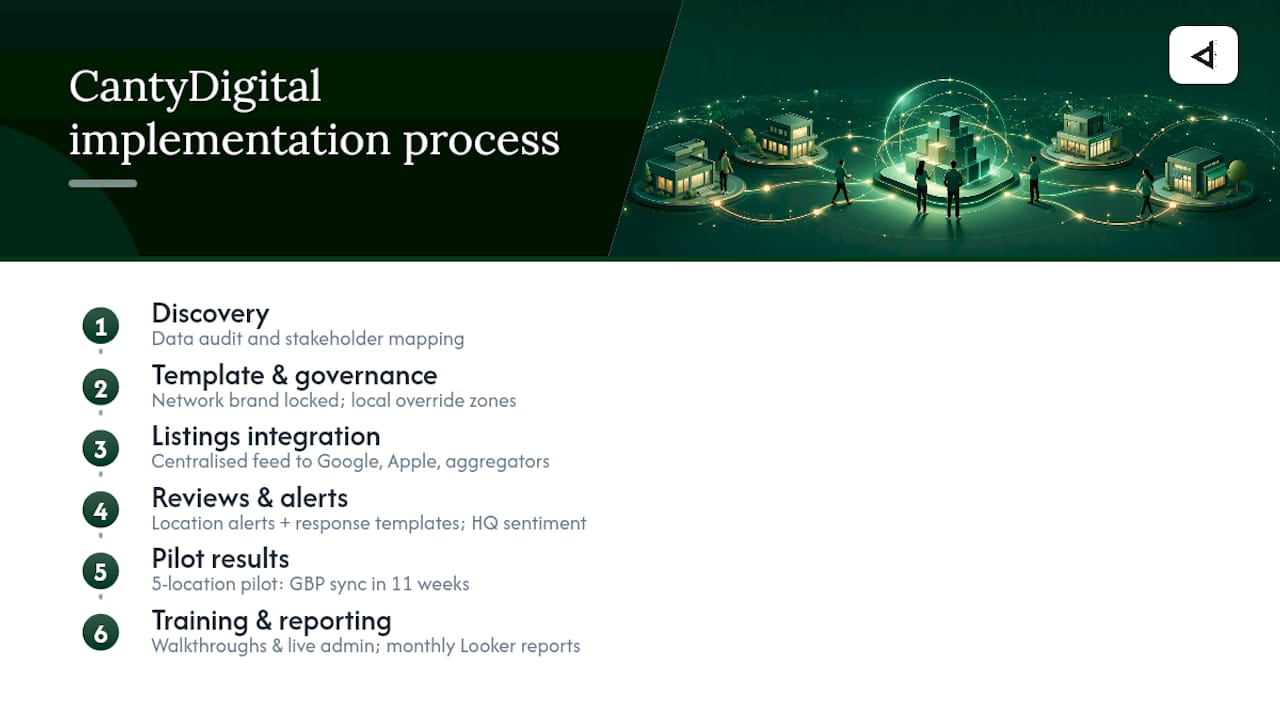
CantyDigital’s implementation process follows a governance-first model. Discovery starts with a full location data audit and a stakeholder mapping session to establish who owns what in the permission hierarchy. From there, the team builds a master template in WordPress Multisite or Wix (as a certified 5-star Wix Partner), locks brand elements at the network level and defines the local override zones for each location.
GBP and listings integration is handled through a centralised data feed, so a single address update propagates to Google, Apple Maps and major data aggregators without manual intervention at the location level. Review workflows are configured so location owners receive new review alerts and suggested response templates, while HQ sees aggregate sentiment scores across the network.
Client example: A pilot rollout for a five-location Australian services business achieved full GBP sync and structured data validation within an 11-week build cycle. Local search impressions for the pilot locations improved within the first 30 days of launch, attributed to corrected NAP consistency and newly published LocalBusiness schema on each location page.
Training is delivered as short recorded walkthroughs for location managers and a live session for regional and HQ administrators. Monthly reporting covers rankings by location, GA4 traffic attribution, review volume and GBP impression trends, delivered as a Looker Studio dashboard the client owns.
CantyDigital’s local SEO services and ongoing retainers cover the post-launch optimisation work that keeps each location page competitive as the network grows.
The platform decision most businesses get wrong
The most common mistake is choosing a platform based on what it can do in a demo rather than what your team can operate on a Tuesday afternoon without agency support. A headless CMS with perfect performance scores is a liability if your marketing manager cannot publish a new location page without filing a developer ticket.
The second mistake is treating the website build and the local SEO stack as separate projects. The platform, the listings manager, the review workflow and the analytics layer need to be designed together from day one. Retrofitting a listings sync onto a site that was built without it in mind costs more than building it correctly the first time.
CantyDigital’s approach, grounded in 12 years of Australian web design and SEO delivery, is to scope both layers in the discovery phase and build them as a single system. That is what separates a multi-location site that ranks from one that just exists.
CantyDigital: expert help for your multi-location website
CantyDigital builds and manages multi-location websites for Australian businesses that need both technical performance and local SEO governance, without locking you into a long-term contract you cannot exit. The typical engagement starts with a scoped pilot for 5–10 locations: we build the master template, configure GBP and listings sync, set up review workflows and hand you a live dashboard before the full rollout begins.
Two common service packages for multi-location businesses:
- Site build + local SEO retainer: Full WordPress Multisite or Wix build with ongoing local SEO management covering rankings, citations and review velocity.
- GBP and review management setup: Listings sync, review triage workflows and monthly reporting for networks that already have a site but need the operational layer.
Browse the website design FAQs to scope your pilot, or contact CantyDigital directly at Cantydigital to book a discovery call.
Useful resources from CantyDigital
- Local SEO services: Practical local search management for each location in your network, covering citations, GBP and review velocity.
- How to update your local SEO strategies: Guidance on keeping location pages and listings aligned after site changes or rebrands.
- Website design FAQs: Common procurement questions answered for businesses scoping a pilot or full rollout.
- SEO FAQs: Short answers to ongoing optimisation and reporting questions for internal stakeholders.
- CantyDigital home: Contact the team directly to book a discovery call or request a tailored platform recommendation for your network.
Sources
- Online Brand Management for Multi-Location Businesses — Vendasta
- Simplified WordPress Multisite Management — Sitelets
- Multi-Location and Franchise Website Platform | SGEN
- DevHub: Franchise Website Platform & CMS
- Franchise platform for multi‑location brands: CMS, commerce, orchestration — Core dna
- Cerca | Franchise CRM & Multi-Location Management Software