


For most Australian small and medium businesses, the answer is straightforward: use Instagram’s native Saved Replies and profile FAQs for fast acknowledgements and common questions, then graduate to Meta API automation only when you need keyword triggers, comment-to-DM flows, or multi-step chatbot journeys.
Two steps to get started right now:
- Switch to a Business or Creator account if you haven’t already, then enable the messaging toggle in your settings.
- Open Meta Business Suite (business.facebook.com) and navigate to Inbox → Automations to activate your Instant Reply and Away Message.
Keep in mind: native auto-replies send identical text to every person who messages you, and Instagram caps profile FAQs at four questions. These are real limits. If your inbox needs contextual, keyword-driven responses, you’ll need a third-party platform connected via the Meta API such as Valiz’s automation and CRM integrations.
Table of Contents
- How to set up auto reply on Instagram using native tools
- When do you actually need third-party automation?
- What you need before you automate: accounts, pages and permissions
- Writing auto-replies that don’t sound like a robot wrote them
- How to test your automations and what to measure
- Privacy and policy considerations for Australian businesses
- Common problems and quick fixes
- Key takeaways
- Why most businesses get Instagram automation backwards
- CantyDigital helps Australian businesses get automation right
How to set up auto reply on Instagram using native tools
What you need first
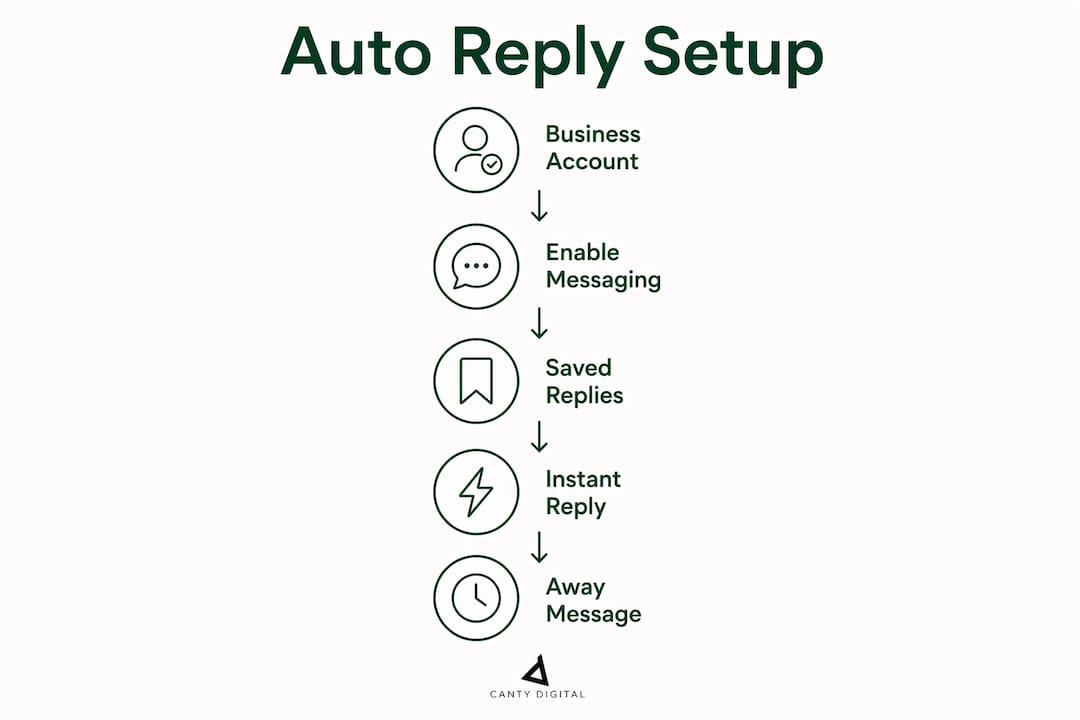
You must have an Instagram Business or Creator account with the messaging toggle enabled. Personal accounts simply don’t have access to these features. You’ll also need your Instagram account linked to a Facebook Business Page to use Meta Business Suite automations.

Setting up Saved Replies in the Instagram app
Saved Replies (sometimes called Quick Replies) are pre-written templates you trigger manually by typing a shortcut word inside a DM conversation. They don’t fire automatically based on incoming message content, but they save your team from retyping the same response dozens of times a day.
- Open Instagram and go to your profile.
- Tap the hamburger menu (three lines, top right) and select Settings and privacy.
- Tap Business tools and controls or Creator tools and controls.
- Tap Saved replies, then the + icon.
- Enter a shortcut word (e.g.,
hours,rates,thanks) and write the full message. - Tap the checkmark to save.
To use a Saved Reply in a conversation, type your shortcut and tap the blue chat bubble that appears.
Setting up profile FAQs
FAQs appear as tappable buttons when someone opens a new DM with you. You can add up to four questions, each with an optional automated response.
- In Settings and privacy, tap Frequently Asked Questions.
- Toggle on Show questions.
- Tap Add question, write the question and its automated response.
- Repeat for up to four questions total.
Setting up Instant Reply and Away Message in Meta Business Suite
This is where true automatic messaging lives. You’ll need a desktop browser for this.
- Go to business.facebook.com and log in.
- Click Inbox in the left menu, then Automations (top right of the inbox).
- Select Instant Reply, toggle it on, and tick the Instagram checkbox.
- Write your message. Click Add personalisation to insert the recipient’s first name.
- Click Save changes.
For an Away Message, follow the same path, select Away Message, add your scheduled away hours, write the message, and save.
Pro Tip: Keep your Instant Reply under 160 characters. Longer messages get skimmed or ignored. Use personalisation tokens (first name) to reduce the robotic feel, and always include a clear next step, such as a link to your booking page or a prompt to reply with a specific word.
When do you actually need third-party automation?
Native Instagram automations handle first-message and out-of-hours scenarios only. They cannot read what someone wrote and respond accordingly. The moment you need contextual replies, you need the Meta Messenger API, accessed through a third-party platform or a custom-built app.
Use cases that require API-based automation:
- Keyword-triggered DMs: A user comments “price” on your post and receives a DM with your rate card automatically.
- Comment-to-DM lead capture: Someone replies to your Story or tags you, triggering a private message sequence.
- Multi-step chatbot flows: Qualify leads, collect contact details, and route to a human agent, all inside Instagram DMs.
- Catalogue and purchase flows: API integration via a Technology Provider lets chatbots serve product catalogues and handle intent-based routing.
- Analytics and CRM sync: Pipe conversation data directly into your CRM for follow-up and attribution.
The trade-offs are real: third-party platforms carry monthly subscription costs, require initial setup time, and place data-handling responsibilities on your business. For a café or local retailer, native tools are usually enough. For an e-commerce brand or a service business running lead-gen campaigns, the API pays for itself quickly.
Pro Tip: Limit automation to the first touch. Complaints, refund requests, and high-value enquiries should route to a human agent immediately. Automation that tries to handle everything tends to damage the brand faster than a slow reply ever would.
What you need before you automate: accounts, pages and permissions
Get these sorted before you touch any automation settings, or you’ll hit permission errors that are frustrating to diagnose.
- Instagram account type: Must be Business or Creator. Personal accounts have no access to messaging automations.
- Messaging toggle: Enabled in your Instagram professional settings.
- Connected Facebook Page: Your Instagram account must be linked to a Facebook Page you own or administer.
- Meta Business Manager: You or your team member needs Owner or Admin access, or at minimum Inbox and Manage permissions assigned in Business Manager.
- For API automation: You’ll need Messenger API access, either through a registered app or a Messenger API Technology Provider, plus a valid Page access token.
One critical interaction to know: when your Away Message is active, Instant Reply will not trigger. The Away Message takes priority. If your Instant Reply seems to have stopped working, check whether your Away schedule is running.
Writing auto-replies that don’t sound like a robot wrote them
The goal is a digital handshake: immediate, warm, and expectation-setting. Here are templates tailored for Australian businesses, plus the structure that makes them work.
Every effective auto-reply has four elements: a brief acknowledgement, an expected response time, a clear next step, and an escalation path for urgent matters.
Instant Reply example:
Away Message example:
FAQ answer example (for “What are your prices?”):
Comment-to-DM lead capture (API-based):
Append UTM parameters to every link in your automated messages so you can track which flows drive actual conversions in Google Analytics or your CRM. Something like ?utm_source=instagram&utm_medium=dm&utm_campaign=auto-reply takes thirty seconds to add and gives you clean attribution data.
Pro Tip: For comment auto-replies, build a library of at least seven response variants and rotate them. Posting the identical reply to every comment is a fast way to trigger Instagram’s repetitive-behaviour detection, which can suppress your account’s reach.
How to test your automations and what to measure
Testing before you go live takes ten minutes and saves you from a week of confused customers.
- Send a test DM to your account from a secondary profile and confirm the Instant Reply fires.
- Trigger each FAQ option and verify the automated response appears correctly.
- If using an Away Message, temporarily set your away schedule to “now” and test from a separate account.
- For API-based keyword triggers, send the exact trigger word and confirm the flow fires as expected.
- Click every link in your automated messages and verify UTM parameters are passing correctly into your analytics platform.
Metrics worth tracking after launch:
- Delivery rate: Are messages actually reaching recipients?
- Click-through rate on links: Are people tapping your CTAs?
- Handover rate: What percentage of conversations escalate to a human agent?
- Conversion rate from DM flows: How many DM conversations result in a booking, sale, or lead form submission?
- Response time KPI: Has automation reduced your average first-response time?
Privacy and policy considerations for Australian businesses
Australian businesses collecting personal information through Instagram automations must consider their obligations under the Privacy Act 1988 and the Australian Privacy Principles. This article is general information only; confirm your specific obligations with a qualified privacy professional.
Practical controls to put in place:
- Never collect sensitive personal information (health data, financial details, government identifiers) through automated DM flows. Use a secure, consent-gated web form instead.
- Minimise data retention: only store conversation data as long as you genuinely need it.
- Follow Meta’s platform policies on messaging, including restrictions on promotional messaging without prior user engagement.
- Maintain a clear human escalation path for any complaint or regulated request received via DM.
Common problems and quick fixes
Auto-reply stopped working entirely:
- Check that the messaging toggle is still enabled in your Instagram professional settings.
- Verify the automation toggle in Meta Business Suite is still on.
- Confirm your Instagram account is still connected to your Facebook Page.
Permission or API errors:
- Re-check your Business Manager role assignments (you need Inbox and Manage permissions).
- Disconnect and reconnect your Instagram account to Meta Business Suite.
- If using API automation, refresh your Page access token; tokens expire and must be regenerated.
Comment auto-replies triggering platform flags:
- Rotate your reply variants (aim for at least seven different phrasings).
- Add a posting delay of 30–60 seconds between automated comment replies.
- Avoid replying to every single comment automatically; set keyword triggers so only relevant comments receive a response.
Key takeaways
Native Instagram auto-replies suit most Australian small businesses for first-touch acknowledgements, while the Meta API is the only path to keyword-triggered, contextual, or comment-driven automation.
| Point | Details |
|---|---|
| Start with native tools | Set up an Instant Reply and Away Message in Meta Business Suite before considering third-party platforms. |
| FAQs are capped at four | Plan your four FAQ questions carefully around your most common enquiries. |
| Away overrides Instant Reply | When your Away Message schedule is active, Instant Reply will not fire; check both toggles when troubleshooting. |
| API needed for keyword flows | Comment-to-DM, keyword triggers, and multi-step chatbots all require Meta API access via a third-party platform. |
| CantyDigital can implement this | CantyDigital designs and briefs Instagram automation strategies for Australian businesses, from native setups to API integration. |
Why most businesses get Instagram automation backwards
There’s a pattern worth naming. Most businesses either do too little (they set up one Instant Reply and call it done) or too much (they wire up a complex chatbot that frustrates anyone with a non-standard question). The sweet spot is narrower than the tools suggest.
Native automations are genuinely underused for what they’re good at: setting expectations and reducing inbox anxiety. An Instant Reply that says “we’ll respond within two hours” is not a replacement for a human; it’s a promise that keeps the customer from messaging three competitors while they wait. That’s worth more than most businesses realise.
The API tools, on the other hand, are often oversold. A keyword-triggered DM flow works brilliantly for a product launch or a lead magnet campaign. It works poorly as a permanent substitute for a real inbox. The businesses that get the most from automation are the ones that use it for the first touch and then hand off to a person quickly.
The other thing most guides skip: connect your DM automation to your website analytics from day one. Appending UTM parameters to every link in your automated messages means you can see exactly which flows drive traffic, leads, and sales. Without that, you’re flying blind on whether the automation is actually helping your social media marketing or just adding noise.
CantyDigital helps Australian businesses get automation right
Setting up Instagram auto-replies is one thing. Connecting them to a website that converts, tracking them through to actual revenue, and keeping the whole system compliant and measurable is another. That’s where CantyDigital comes in.
CantyDigital is a Wollongong-based digital agency with 12 years of experience helping Australian businesses build web and social systems that work together. Whether you need a developer brief for Meta API integration, a social media strategy that includes DM automation, or a website built to convert the traffic your automations generate, the team handles it without lock-in contracts. If you’re ready to connect your Instagram automation to a measurable growth system, get in touch with CantyDigital or explore the website design and SEO services available for Australian businesses.