


Web accessibility is the practice of designing and developing websites so all users, including those with disabilities, can perceive, understand, navigate, and interact with content equally. The industry standard governing this practice is the Web Content Accessibility Guidelines (WCAG), published by the W3C, which defines four core principles known by the acronym POUR: Perceivable, Operable, Understandable, and Robust. Accessibility in web design is no longer a niche concern. Legal risks are rising with near-record federal accessibility lawsuits recorded in 2025, and 89% of digital experience professionals now view accessibility as a competitive advantage. For web designers, developers, and content creators, understanding what accessibility means in practice is the foundation of building sites that work for everyone.
What are the core principles and guidelines of web accessibility?
WCAG 2.1, published by W3C, is the industry benchmark for accessible web design. It organises every requirement under the four POUR principles, which give designers a clear framework for evaluating any interface decision.
The four principles work like this:
- Perceivable: All content must be presentable to users in ways they can detect. This means providing text alternatives for images, captions for video, and sufficient colour contrast so that people with low vision can read the page.
- Operable: Every function on the site must be reachable without a mouse. Keyboard navigation, skip links, and adequate time limits on timed interactions all fall under this principle.
- Understandable: Content and controls must be predictable and clear. This covers plain language, consistent navigation, and helpful error messages on forms.
- Robust: Code must be written so that current and future assistive technologies, such as screen readers and voice control software, can reliably interpret it. Semantic HTML is the primary tool here.
WCAG 2.2, the most recent update, adds criteria focused on cognitive and mobile accessibility. Regulatory frameworks in Australia and internationally increasingly require adherence to WCAG 2.2 by 2026. Level AA conformance remains the common compliance target for most organisations.
Pro Tip: Bookmark the W3C’s official WCAG Quick Reference tool. It lets you filter success criteria by principle and conformance level, which saves hours when auditing an existing site.

How does inclusive design expand on accessibility in web design?
Inclusive design is a broader philosophy than accessibility compliance. Accessibility asks whether a site meets a defined standard. Inclusive design asks whether the site works well for the widest possible range of people, including those whose needs fall outside any checklist.
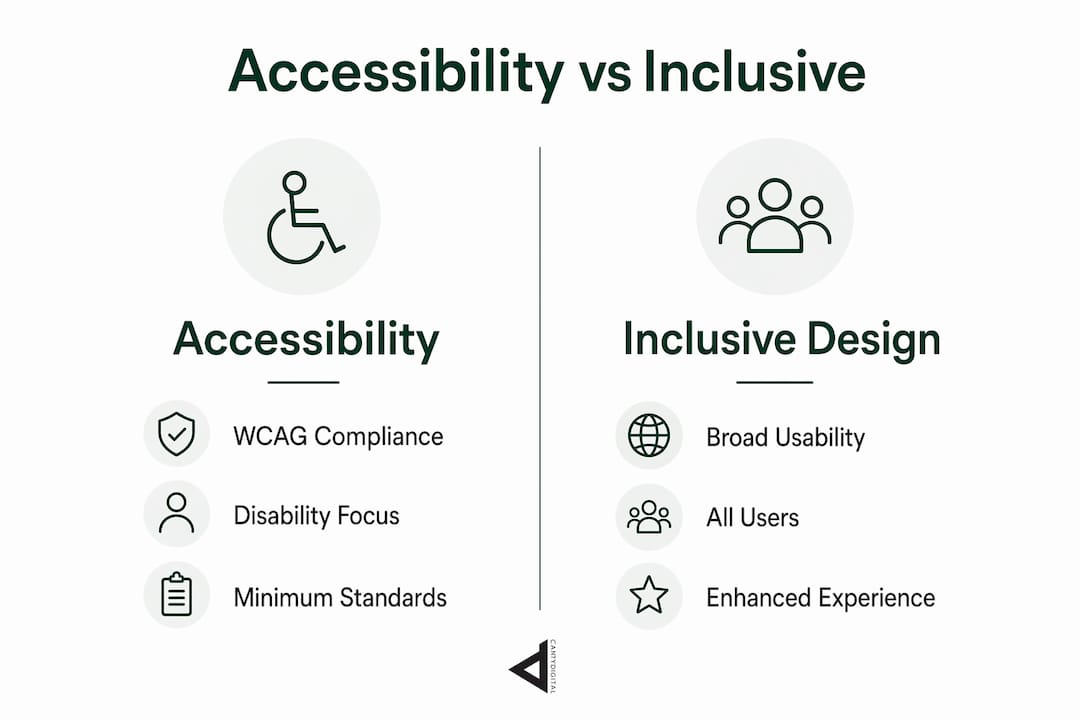
Inclusive design requires avoiding assumptions about the “ideal user.” Most designers unconsciously build for a person who is sighted, right-handed, neurotypical, and using a desktop browser. That assumption excludes a significant portion of real users before a single line of code is written.
Practical inclusive design strategies include:
- Building user personas that reflect varied physical, neurological, and situational conditions, not just demographic segments.
- Testing prototypes with people who use assistive technologies, including screen readers, switch controls, and voice input.
- Designing for context, not just capability. A user holding a phone in bright sunlight faces a situational impairment that affects contrast needs just as much as a permanent vision condition.
- Writing content at a reading level that serves users with cognitive disabilities, non-native speakers, and people reading quickly on mobile.
Accessible design benefits all users, not only those with permanent impairments. This is known as the “curb-cut effect,” named after the kerb ramps originally built for wheelchair users that turned out to benefit parents with prams, delivery workers, and cyclists. The same principle applies online: captions help people in noisy environments, high contrast helps users in poor lighting, and clear navigation helps everyone.
What are the practical steps to design and develop accessible websites?
Building accessibility into workflows from the start saves significant time and cost compared to retrofitting it later. Accessibility added at the end of a project often requires structural changes to the codebase that could have been avoided with early planning.
Follow these steps to integrate accessibility throughout your process:
- Start with semantic HTML. Use the correct element for each purpose:
<button>for buttons,<nav>for navigation,<h1>through<h6>for headings in logical order. Semantic markup gives assistive technologies the information they need to describe the page accurately. - Write descriptive alt text for every meaningful image. Alt text should convey the purpose of the image, not just its appearance. A graph showing revenue growth needs alt text that summarises the trend, not just “graph.”
- Check colour contrast ratios. WCAG Level AA requires a contrast ratio of at least 4.5:1 for normal text. Tools like the WebAIM Contrast Checker let you test any colour combination in seconds.
- Test keyboard navigation. Tab through every page without touching the mouse. Every interactive element, including menus, modals, and form fields, must be reachable and operable by keyboard alone.
- Maintain a logical heading order. Screen reader users often navigate a page by jumping between headings. Skipping from an
<h1>to an<h4>creates confusion and breaks the document structure. - Test with real assistive technology. Use NVDA or VoiceOver to experience the site as a screen reader user does. Automated tools catch roughly 30% of accessibility issues. Manual testing with assistive technology catches the rest.
- Include users with disabilities in testing. Empathy and continuous testing are the most reliable methods for identifying barriers that automated tools miss entirely.
Pro Tip: Run an automated audit with a tool like Axe or WAVE at the end of every sprint, not just before launch. Catching issues early keeps the remediation cost low and prevents technical debt from accumulating.
What are the broader benefits of web accessibility for SEO, UX, and business success?
Accessible websites use cleaner, more semantic code that search engines can index more effectively. Google’s crawlers read a page similarly to how a screen reader does. Logical heading structure, descriptive link text, and meaningful alt attributes all contribute directly to better search rankings.
The business case for accessibility is strong and growing. 75% of digital experience professionals link accessibility directly to improved revenue. That figure reflects the reality that accessible sites convert better, load faster, and retain users longer.
| Benefit area | How accessibility contributes |
|---|---|
| SEO and indexing | Semantic HTML and descriptive text improve crawlability and ranking signals |
| User experience | Clear navigation and readable content reduce bounce rates for all visitors |
| Legal risk reduction | WCAG conformance reduces exposure to accessibility lawsuits |
| Revenue and conversion | Broader audience reach increases potential customer base |
| Brand reputation | Accessible sites signal social responsibility and build audience trust |
Accessible design also reduces the cost of customer support. When forms are clearly labelled and error messages are specific, users complete tasks without needing assistance. That efficiency compounds across thousands of sessions.
What challenges do web professionals face with accessibility, and how can they overcome them?
The biggest barrier to accessible web design is a lack of education. Nearly 93% of web professionals surveyed globally have received no formal training in web accessibility. That gap means most designers and developers are learning on the job, often after a problem has already reached production.
Common challenges and practical responses include:
- Treating accessibility as a checklist. Passing an automated audit does not mean a site is accessible. Accessibility is an ongoing design philosophy, not a one-time task. Build review cycles into your workflow so accessibility is reassessed with every significant update.
- Assuming accessibility is expensive. Retrofitting accessibility late is genuinely costly. Integrating it from the start adds minimal overhead and prevents the far greater expense of rebuilding components after launch.
- Working in silos. Accessibility requires collaboration between designers, developers, and content creators. A designer who specifies sufficient contrast ratios cannot compensate for a developer who overrides those values in CSS, or a content creator who uploads images without alt text.
- Skipping user research. Personas built without input from people with disabilities will miss real barriers. Recruiting participants with varied abilities for usability testing is the most direct way to close that gap.
Proactive education through resources like the W3C’s free Web Accessibility Initiative (WAI) courses and the Interaction Design Foundation’s inclusive design materials gives teams a shared vocabulary and a practical foundation.
Key takeaways
Accessibility in web design means building sites that work for all users by following WCAG standards, applying inclusive design principles, and testing continuously with real people.
| Point | Details |
|---|---|
| WCAG is the standard | Follow WCAG 2.2 Level AA as the baseline for compliance and best practice. |
| POUR principles guide every decision | Every design choice should be Perceivable, Operable, Understandable, and Robust. |
| Start early to save cost | Integrating accessibility from project start avoids expensive retrofitting later. |
| Accessibility improves SEO | Semantic, clean code helps search engines index your site more effectively. |
| Education is the critical gap | 93% of web professionals lack formal accessibility training. Proactive learning closes that gap. |
Accessibility is not a feature, it is the baseline
I have reviewed hundreds of websites over the years, and the pattern is consistent: accessibility is treated as something to add at the end, like a coat of paint. That approach is wrong, and the industry is slowly learning why.
The sites that genuinely work for everyone are not the ones that passed an automated audit. They are the ones built by teams who asked “who are we leaving out?” at the start of every design sprint. That question changes the decisions you make about colour, typography, navigation, and content before a single component is built.
What I find most encouraging in 2026 is the shift in how accessibility is framed. The conversation has moved from compliance and risk avoidance toward accessibility as a driver of better design for everyone. That is the right framing. When you design accessible websites with real users in mind, the result is a site that is clearer, faster, and more useful for your entire audience, not just the segment with a diagnosed disability.
The uncomfortable truth is that most accessibility failures are not technical. They are cultural. Teams that do not include people with disabilities in their research will keep building barriers they cannot see. Fix the culture first, and the technical fixes become obvious.
— Matthew
How CantyDigital can support your accessibility and SEO goals
Accessibility and SEO share the same foundation: clean code, clear structure, and content that communicates precisely. CantyDigital builds websites from the ground up with both in mind, which means your site is positioned to rank well and serve every visitor who lands on it.
If your current site has accessibility gaps, those same gaps are likely holding back your search performance. CantyDigital’s SEO audit service identifies structural issues that affect both accessibility and rankings, giving you a clear picture of what to fix and why. For businesses ready to grow, our affordable SEO plans include ongoing technical optimisation that keeps your site compliant, fast, and visible. Reach out to the CantyDigital team to find out what is holding your site back.
FAQ
What is accessibility in web design?
Accessibility in web design is the practice of building websites that all users, including those with disabilities, can perceive, navigate, and interact with effectively. The WCAG framework, published by W3C, defines the standards that guide this practice.
What does WCAG Level AA mean?
WCAG Level AA is the middle conformance tier of the Web Content Accessibility Guidelines and the most commonly required standard for legal compliance. It covers criteria such as colour contrast ratios, keyboard operability, and descriptive form labels.
Does accessibility help with SEO?
Accessible websites use semantic HTML and descriptive text that search engines read more effectively, which improves indexing and ranking. Semantic code and accessibility align directly with how Google crawls and evaluates pages.
How do I test a website for accessibility?
Start with automated tools such as Axe or WAVE to catch common issues, then test manually using keyboard navigation and a screen reader like NVDA or VoiceOver. Include users with disabilities in your testing to identify barriers that automated tools cannot detect.
What is the difference between accessibility and inclusive design?
Accessibility focuses on meeting defined standards so people with disabilities can use a site. Inclusive design is a broader philosophy that avoids assumptions about the ideal user and considers the full range of human diversity, including temporary and situational impairments, from the start of the design process.


