


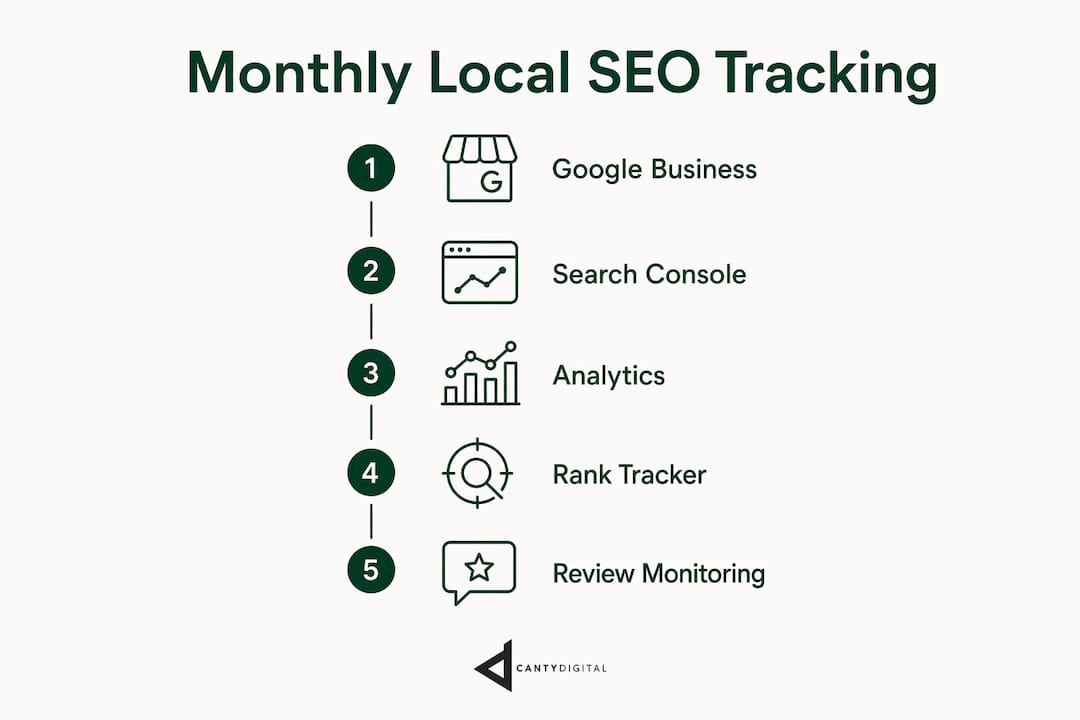
The most effective way to track local SEO results monthly is to focus on three Google Business Profile metrics first: phone calls, direction requests, and website clicks. These tell you whether real customers are finding and contacting your business, not just whether you appear somewhere in search. Layer in geo-grid heat map tracking to see exactly where your rankings sit across different suburbs, then add competitor benchmarking to understand whether your gains are genuine or just a market-wide shift.
Here is what a practical monthly tracking routine covers:
- Google Business Profile metrics: calls, direction requests, and website clicks as your baseline
- Geo-grid rank tracking: suburb-by-suburb visibility on Google Maps, not just a single keyword position
- Review monitoring: new review volume, average rating, and response rate month over month
- Google Search Console and Google Analytics 4: organic traffic, click-through rates, and on-site behaviour
- Competitor benchmarking: how your review velocity and ranking positions compare to local rivals
- Report timing: schedule tracking during business hours so Google’s “open now” prioritisation reflects your real-world visibility
Which local SEO metrics should you monitor every month?
Google Business Profile metrics form the foundation: phone calls, direction requests, and website clicks. Pull these from the Performance tab, set a three-month window, and compare to the prior period. Growth here means your SEO is converting to actual customer intent, not just impressions.
Rankings on Google Maps and in the local pack matter, but they are not static. Google personalises results based on a searcher’s physical location, so a single keyword position means very little on its own. What you want is a trend across a grid of locations over time.
Tracking review volume, recency, and sentiment each month is as important as ranking data. Fresh, frequent reviews signal an active business to Google and directly influence local pack visibility. Read what customers say, not just how many stars they leave.
Engagement signals round out the picture. Booking clicks, Q&A interactions, and photo views in your Google Business Profile all indicate whether your listing converts browsers into customers. A profile with strong rankings but low engagement often needs description, photo, or service updates rather than more link building.
Google Search Console shows you which search queries drive clicks to your website, and Google Analytics 4 reveals what visitors do once they arrive. Together, they connect your local visibility to actual website behaviour and conversions. Set up UTM parameters on your Google Business Profile website link so GA4 can attribute traffic correctly.
What tools help you monitor local SEO progress in Australia?
BrightLocal Local Rank Tracker is the go-to for grid-based rank tracking. It monitors up to 100 keywords across Google Search, Google Maps, desktop, and mobile, and lets you schedule reports to run weekly or monthly on a day of your choosing. The geo-grid view shows your visibility across multiple locations simultaneously, which is far more useful than a single keyword position for any business serving multiple suburbs.

Google Business Profile Insights gives you the core metrics directly from Google at no cost. It covers calls, direction requests, and website clicks with monthly trend data. The limitation is that it shows broad geographic data without competitor context, so it works best as a starting point rather than a complete picture.
Google Search Console tracks keyword performance and organic click-through rates for your website. It is free, updated regularly, and shows you exactly which search terms bring visitors to your site. Pair it with GA4 to connect keyword data to on-site conversions.
Google Analytics 4 handles the behaviour side: what pages visitors land on, how long they stay, and whether they complete a goal like a contact form submission or phone click. For local SEO performance metrics, GA4 is where you connect visibility data to revenue signals.

| Tool | Primary use | Cost | Best for |
|---|---|---|---|
| BrightLocal Local Rank Tracker | Grid-based rank tracking across suburbs | Paid | Suburb-level visibility trends |
| Google Business Profile Insights | Core GBP metrics: calls, directions, clicks | Free | Monthly baseline tracking |
| Google Search Console | Keyword and click-through data | Free | Organic search performance |
| Google Analytics 4 | On-site behaviour and conversions | Free | Connecting traffic to outcomes |
Pro Tip: Schedule BrightLocal reports to run during your actual business hours. Google prioritises businesses marked as “open now” in local search, so a report running at 2:00 AM will show rankings that do not reflect what customers see on a Tuesday afternoon.
For location-specific keyword tracking, focus on high-intent, category-specific terms with location modifiers. “Emergency plumber Wollongong” will give you more useful data than “plumber” alone. Stick with the same keyword set for at least three to six months; changing keywords resets your tracking history to zero.
How to build a monthly local SEO report that actually gets used
A monthly local SEO report needs a consistent cadence and a clear structure. Run it on the same date each month, during business hours, so your data is comparable period to period.
- Set your baseline first. Before you can report on growth, you need three months of data for calls, direction requests, and website clicks. Without a baseline, you are comparing numbers with no context.
- Choose KPIs that connect to revenue. Calls, direction requests, and website clicks are the right focus. Impressions and single keyword positions are context, not conclusions.
- Add trend visualisations. A heat map showing suburb-level ranking changes, a line chart for monthly call volume, and a bar chart for review growth communicate more in ten seconds than a table of numbers.
- Compare to the prior period and the prior year. Month-on-month shows momentum; year-on-year removes seasonal noise.
- Include competitor benchmarking. Show how your review count, average rating, and ranking positions compare to two or three local competitors. This turns a performance report into a strategic document.
- Write a one-paragraph executive summary. State what improved, what declined, and what you plan to do about it. Business owners read the summary; they skim the data.
| Report section | What to include | Why it matters |
|---|---|---|
| Executive summary | Key wins, key drops, next action | Gives decision-makers a fast read |
| GBP metrics | Calls, directions, clicks vs prior period | Shows customer intent trends |
| Rank tracking | Grid heat map, top keyword movements | Reveals suburb-level visibility |
| Review summary | New reviews, average rating, response rate | Tracks reputation and ranking signals |
| Website data | Organic sessions, top landing pages, conversions | Connects visibility to revenue |
| Competitor snapshot | Review count, rating, estimated ranking | Provides strategic context |
How to interpret local SEO data without being misled by it
Metrics in isolation mislead. A spike in impressions means nothing if calls are flat. A drop in one keyword’s ranking might be offset by gains across ten others in the suburbs that actually matter to your business.
High search visibility with low conversions is a profile problem, not a ranking problem. When people find you but do not call or click, the fix is usually in your description, photos, services list, or review responses, not in more link building.
Competitor behaviour explains a lot of what looks like your own performance changing. If a rival suddenly doubles their review count or adds a new service category, your relative ranking can drop without you doing anything wrong. Checking competitor review velocity and category updates monthly gives you that context.
Timing matters more than most business owners realise. Google prioritises businesses that are currently open, so rankings tracked at 2:00 AM look different from rankings tracked at 11:00 AM on a weekday. Always compare data collected at similar times and days.
Meaningful trends take time to emerge. Reacting to a single week of ranking drops often leads to changes that undo work that was actually performing well. Consistent data collected over several weeks gives you the pattern recognition to act with confidence rather than anxiety.
Pro Tip: When you see high visibility but low engagement, audit your Google Business Profile description, add recent photos, and check that your services list matches what customers are searching for. Ranking higher will not fix a listing that does not convert.
Audit tools that keep your local SEO healthy month to month
Rank tracking tells you where you stand. Audit tools tell you why. A monthly local SEO audit checklist should cover citation consistency, profile completeness, and technical website health.
Citation audits check that your business name, address, and phone number appear identically across directories like Yellow Pages, True Local, and Google Business Profile. Inconsistencies confuse Google and suppress local rankings. Tools like BrightLocal’s Citation Tracker surface these discrepancies automatically.
Profile completeness checks review whether your Google Business Profile has current photos, an accurate services list, updated business hours, and a populated Q&A section. Google rewards complete profiles with better visibility.
Website technical audits cover page speed, mobile usability, and structured data markup. A slow-loading contact page costs you conversions that your ranking work earned. Google Search Console flags crawl errors and mobile issues at no cost.
Run a full audit quarterly and a lighter check monthly. The monthly check focuses on GBP accuracy and new citation errors; the quarterly audit goes deeper into technical health and content gaps.
Common pitfalls when tracking local SEO month to month
Tracking at the wrong time. Running reports overnight or on weekends produces data that does not reflect peak customer search behaviour. Schedule reports during your actual business hours.
Changing keywords too often. Every keyword change resets your tracking history. Choose location-specific, high-intent terms from the start and commit to them for at least three to six months before reassessing.
Reacting to short-term fluctuations. Rankings move week to week for reasons outside your control: algorithm updates, competitor activity, seasonal shifts. Meaningful trends need consistent data collected over several weeks before you draw conclusions or change strategy.
Focusing on vanity metrics. Impressions and total keyword count look impressive in a report but rarely correlate with revenue. Calls, direction requests, and website clicks are the numbers that tell you whether customers are choosing your business.
Ignoring competitor context. A drop in your rankings might reflect a competitor’s improvement rather than a problem with your own profile. Always check competitor activity before making changes.
Not setting a baseline. Without three months of historical data, you cannot tell whether a number is good, bad, or normal for your business. Start tracking before you start optimising.
How to integrate reviews and reputation monitoring into monthly tracking
Reviews do two jobs: they influence rankings and they influence purchase decisions. Monthly tracking should cover both dimensions.
Track new review volume, average star rating, and response rate each month. A business that receives ten new reviews in a month and responds to all of them sends stronger signals to Google than one that receives twenty and ignores them. Response rate is a metric most business owners overlook.
Read the text of new reviews, not just the star rating. Recurring phrases like “fast response” or “hard to find parking” reveal what customers value and what friction points exist. This qualitative data feeds directly into your Google Business Profile description and services updates.
Compare your review velocity to local competitors monthly. If a competitor is gaining reviews faster than you, their ranking advantage will compound over time. A simple review request process, sent to customers after a completed job, is the most direct way to close that gap.
Reputation monitoring extends beyond Google. Check Facebook, True Local, and any industry-specific directories relevant to your category. A negative review on a platform you are not watching can sit unanswered for months, quietly damaging trust with potential customers who research across multiple platforms before making contact.
Key takeaways
Tracking local SEO results monthly works when you focus on intent-based metrics, schedule data collection during business hours, and compare your performance against competitors rather than in isolation.
| Point | Details |
|---|---|
| Start with GBP metrics | Track calls, direction requests, and website clicks monthly as your core performance baseline. |
| Use geo-grid rank tracking | Suburb-level heat maps reveal visibility gaps that single keyword positions cannot show. |
| Schedule reports during business hours | Google prioritises open businesses, so overnight tracking produces misleading ranking data. |
| Build trends before reacting | Consistent data collected over several weeks is needed before ranking changes justify a strategy shift. |
| Combine metrics with competitor data | Reviewing competitor review velocity and rankings turns raw data into a decision you can act on. |
CantyDigital helps Australian businesses track and grow local SEO
CantyDigital is a Wollongong-based digital agency with 12 years of experience in signal-based SEO for Australian small businesses. If you want someone to handle the monthly tracking, reporting, and optimisation so you can focus on running your business, CantyDigital’s monthly SEO plans start from $170 per month with no lock-in contracts. Every plan includes local rank tracking, Google Business Profile optimisation, and clear monthly reporting tied to the metrics that actually drive revenue.